> ## Documentation Index
> Fetch the complete documentation index at: https://docs.fizen.io/llms.txt
> Use this file to discover all available pages before exploring further.
# Paying by Card, Apple Pay or Google Pay
> Which cards work for Fizen eSIM checkout, which cards can't be used, and what to do if your card is declined.
Card, Apple Pay and Google Pay payments for Fizen eSIM are processed by **Stripe**, a global payment provider. Your card details are encrypted and handled by Stripe. Fizen never stores your card number.
Most cards go through first time. When one doesn't, the reason is almost always the card itself: where it was issued, which network it runs on, or a setting in your banking app. This page helps you pick a card that works.
***
## Cards that work best
Before you pay, check that your card is:
Checkout accepts **Visa** and **Mastercard**, both credit and debit. Other card brands may not be accepted.
Some bank cards only run on a local network inside one country. Those can't pay an international merchant online. Example: a Vietnamese ATM card that only works on the Napas network. Look for the Visa or Mastercard logo on the card.
Many banks switch off online, card-not-present or international payments by default. Open your banking app and turn them on before checkout.
Your bank may ask you to confirm the payment with a one-time code or in its app (3D Secure). Keep your phone and banking app at hand, and don't close the Fizen App while you confirm.
Plans are priced in USD. If your card is in another currency, your bank may add a foreign transaction fee. A card with no foreign transaction fees keeps the price exactly as shown.
***
## Cards that can't be used
Stripe follows international sanctions and card network rules, so some cards can't be charged at all, however many times you try. Per [Stripe's guidance on sanctions](https://support.stripe.com/questions/sanctions-on-russia-and-belarus) and its [list of prohibited jurisdictions](https://stripe.com/legal/restricted-businesses):
| Card or payment | Why it fails |
| -------------------------------------------------------------------------------------------------------------- | -------------------------------------------------------------------------------------------- |
| Cards issued by banks in **Russia** | Major card networks no longer serve Russian banks, so these payments are unlikely to succeed |
| **Mir** cards | Stripe doesn't support the Mir payment system |
| Cards from sanctioned **Russian or Belarusian** banks | Stripe won't process payments involving these banks |
| Cards or payments linked to **Cuba, Iran, North Korea, Syria**, or the **Crimea, Donetsk and Luhansk** regions | Prohibited jurisdictions for Stripe |
| Domestic-only cards without Visa or Mastercard | They can't be used for international online payments |
Every payment method, USDT included, remains subject to applicable sanctions laws and the [Fizen Terms of Use](/information/terms-of-use), which don't allow the use of Fizen by sanctioned persons.
***
## Apple Pay and Google Pay
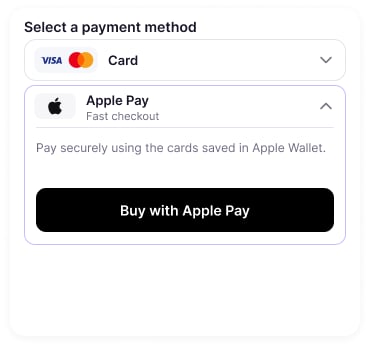
Apple Pay and Google Pay are the fastest way to check out. You don't type any card details.
* **They charge the card saved in your wallet.** The same card rules apply: if a card can't be used on its own, it won't work through Apple Pay or Google Pay either.
* **Apple Pay** appears on iPhone and iPad when a card is set up in Apple Wallet.
* **Google Pay** appears on Android when a card is set up in Google Wallet.
* **Availability depends on your bank and country.** If you don't see the option, your bank may not support it. Pay by card instead.
 ***
## Card declined? Try this
Make sure it's a Visa or Mastercard issued outside the restricted list above.
Enable them in your banking app, then try again.
Complete the one-time code or in-app approval from your bank. If the prompt timed out, start checkout again.
Some cards have a separate daily limit for online payments.
Several failed attempts in a row can make your bank block the card temporarily as a fraud precaution.
Try a different Visa or Mastercard, or Apple Pay or Google Pay with another card saved.
Declines are decided by the bank or card network that issued your card. Your bank can tell you the exact reason and lift a block.
You can also pay with **USDT** from your Fizen wallet balance. USDT payments don't run through card networks, so none of the card rules above apply to them.
***
## Common questions
No. A declined payment isn't charged. Your bank may briefly show a pending authorization, which it releases on its own, usually within a few business days depending on the bank.
No. Card details are encrypted and handled by Stripe. If you turn on **Save card for future purchases**, Stripe keeps the card securely so your next checkout is one tap.
Often yes, if it's a Visa or Mastercard enabled for international online payments. Some prepaid and virtual card issuers decline these payments, so check with your card provider if it doesn't go through.
Open the **in-app live chat** with a screenshot of the error and the card brand you tried (never send your full card number). A real person will help you.
***
## Card declined? Try this
Make sure it's a Visa or Mastercard issued outside the restricted list above.
Enable them in your banking app, then try again.
Complete the one-time code or in-app approval from your bank. If the prompt timed out, start checkout again.
Some cards have a separate daily limit for online payments.
Several failed attempts in a row can make your bank block the card temporarily as a fraud precaution.
Try a different Visa or Mastercard, or Apple Pay or Google Pay with another card saved.
Declines are decided by the bank or card network that issued your card. Your bank can tell you the exact reason and lift a block.
You can also pay with **USDT** from your Fizen wallet balance. USDT payments don't run through card networks, so none of the card rules above apply to them.
***
## Common questions
No. A declined payment isn't charged. Your bank may briefly show a pending authorization, which it releases on its own, usually within a few business days depending on the bank.
No. Card details are encrypted and handled by Stripe. If you turn on **Save card for future purchases**, Stripe keeps the card securely so your next checkout is one tap.
Often yes, if it's a Visa or Mastercard enabled for international online payments. Some prepaid and virtual card issuers decline these payments, so check with your card provider if it doesn't go through.
Open the **in-app live chat** with a screenshot of the error and the card brand you tried (never send your full card number). A real person will help you.